Office Tasks Planner Canva KDP Interior: Your Fully Customizable, Print-Ready Productivity Tool
Staying organized in today’s fast-paced work environment isn’t just helpful—it’s essential. Whether you're a solopreneur managing client projects, a remote team lead coordinating deadlines, or an administrative professional juggling meetings, follow-ups, and daily logistics, scattered notes and fragmented tools often lead to missed opportunities, duplicated effort, and unnecessary stress. That’s where the Office Tasks Planner Canva KDP Interior steps in—not as another static PDF planner, but as a dynamic, editable foundation designed for real-world office workflows.
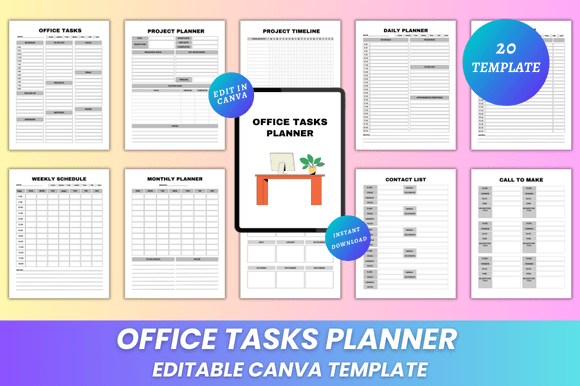
This isn’t a one-size-fits-all template buried under rigid formatting. The Office Tasks Planner Canva KDP Interior is built from the ground up for flexibility and function. Every page—20 in total—is fully editable in Canva. You’re not locked into preset fonts, colors, or layouts. Instead, you control everything: adjust heading sizes for readability, swap color palettes to match your brand, reposition sections to prioritize what matters most to *your* role, and even insert photos, logos, or screenshots to personalize task tracking or project documentation.
Imagine preparing for a quarterly review: with the Editable Office Tasks Planner Canva KDP Interior, you can quickly customize the Project Timeline page to reflect your current initiatives, update the Lead Follow Ups section with fresh contact details, and embed a branded header on the Contact List page—all before your first cup of coffee. No design skills required. Just open the included Canva link, make changes in minutes, and export.
What makes this interior truly practical is its balance of structure and adaptability. It includes thoughtful, high-utility sections like Daily Planner, Weekly Schedule, and Monthly Planner—not as decorative placeholders, but as functional frameworks that support time-blocking, deadline mapping, and priority alignment. The Yearly Overview helps you zoom out for strategic planning, while Important Notes and My Notes offer flexible space for reflections, action items, or quick reference—without cluttering core planning views.
For professionals who rely on consistency across teams or clients, the Office Tasks Planner Canva KDP Interior delivers clean, minimal design without sacrificing utility. There’s no bleed, no guesswork about print margins—just crisp, professional 8.5 × 11 inch pages optimized for home printers, local print shops, or KDP publishing. You’ll receive high-resolution PDFs (print-ready), plus JPG and PNG files—ideal for digital use, sharing via email, or embedding into internal wikis or training materials.
Consider how different users apply it uniquely:
- Sales professionals use the Call To Make and Lead Follow Ups pages to track outreach cadences and conversion touchpoints—customizing fields to include deal stage, next step, and owner.
- Project managers repurpose the Project Planner and Meeting List to align cross-functional timelines, assign owners, and log decisions—then export updated versions after each sprint review.
- Small business owners combine the Password Tracker (with secure placeholder fields) and Thank You page to streamline client onboarding and post-delivery appreciation—adding their own tone and branding throughout.
Unlike generic planners that assume a “default” workflow, this interior invites intentionality. You decide whether the To Do List appears as checkboxes or priority-numbered items. You choose if the Schedule page emphasizes time slots or task categories. You determine how much visual breathing room supports your focus—light gray grids, bold headers, or soft pastel accents. That level of control transforms passive planning into active ownership of your workflow.
And because it’s built for KDP creators and independent designers, the Office Tasks Planner Canva KDP Interior also serves as a reliable, scalable product base. If you sell digital planners, you can rapidly iterate new versions—launching seasonal editions, industry-specific variants (e.g., “HR Office Planner” or “Legal Admin Tasks Planner”), or accessibility-focused layouts—all from the same editable source. Lifetime access means updates and new designs are yours to adopt as they’re released—no extra fees, no subscription hoops.
Practical implementation starts simply: download your instant-access files, click the editable Canva link, and begin customizing. Try these three low-effort, high-impact adjustments first:
- Update the cover page with your name, title, or business logo—this sets the tone for every printed or shared copy.
- Reorder pages in Canva to match your actual weekly rhythm (e.g., move Daily Planner to the front if you start each day there).
- Color-code sections using Canva’s palette tool—blue for meetings, green for tasks, amber for deadlines—to create visual anchors at a glance.
Remember: productivity tools only work when they fit *your* habits—not the other way around. The Office Tasks Planner Canva KDP Interior removes friction by meeting you where you are: in Canva, a platform millions already use daily. No new software to learn. No complex setup. Just clarity, control, and consistency—delivered in a format that prints beautifully, shares seamlessly, and evolves with your needs.
If you’ve tried planners that felt too rigid, too generic, or too hard to maintain, this interior offers a refreshingly human-centered alternative. It’s not about adding more to your plate—it’s about designing the plate itself so everything fits, functions, and feels aligned with how you actually work. And with new designs added regularly, your toolkit stays current, relevant, and ready to grow alongside you.