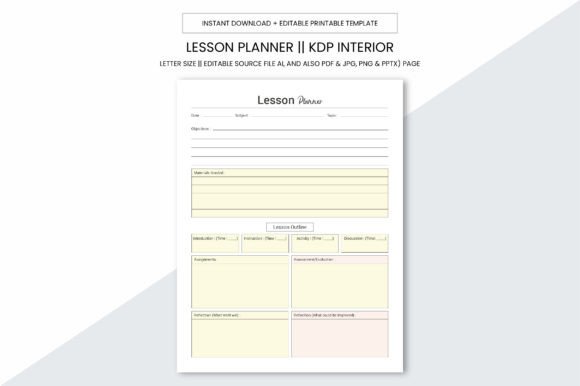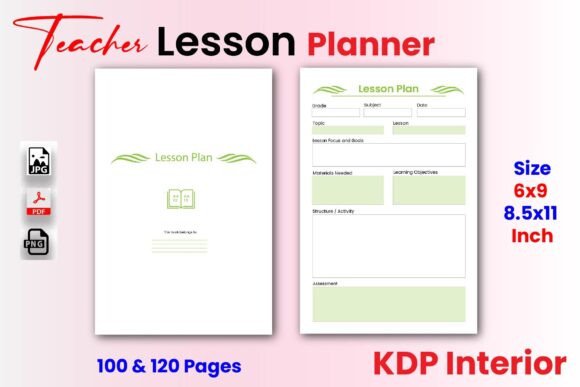
Teacher Lesson Planner KDP Interior PDF
If you're designing a printable lesson planner for Amazon KDP—or even just building a clean, functional planner for your own classroom—the Teacher Lesson Planner KDP Interior PDF isn’t just another template. It’s a ready-to-upload interior file built with real-world publishing and teaching needs in mind. No redesigning margins, no guessing at bleed or DPI settings, no scrambling to convert pages before upload. It arrives print-ready, professionally structured, and thoughtfully sized for both 8.5x11 and 6x9 inch formats—two of the most common KDP trim sizes educators and indie publishers actually use.
This isn’t a generic PDF with placeholder text and flimsy layouts. It’s a 100–120 page interior designed specifically for teachers, homeschoolers, curriculum designers, and KDP sellers who want consistency, clarity, and control. Every page supports daily planning, weekly overviews, objective tracking, reflection prompts, and space for notes—without visual clutter. And because it’s delivered in black and white at 300 DPI, it prints cleanly on standard home printers *and* meets KDP’s production standards without extra formatting work.
Where This Planner Fits Into Real Teaching Life
Think about Monday morning: You’ve got five classes, a staff meeting, and a parent email waiting. You open your digital planner—and realize half the fields don’t match your school’s pacing guide. Or worse—you’re still handwriting lesson notes in a spiral notebook, then re-typing them into your LMS later. That’s where the Teacher Lesson Planner KDP Interior PDF shifts from “nice to have” to “why didn’t I get this sooner?”
For classroom teachers, it serves as a physical anchor—something tactile and distraction-free. You can write in it during prep periods, highlight standards mid-lesson, or sketch quick diagrams beside learning objectives. For homeschool parents juggling multiple grade levels, the dual-size option means they can choose compact 6x9 for portability (toss it in a tote bag alongside student notebooks) or go full-size 8.5x11 for more writing space during long planning sessions.
KDP Sellers: Skip the Formatting Headaches
If you’re creating and selling lesson planners on Amazon KDP, time is your most valuable resource—and formatting is where hours vanish. You know the drill: adjusting gutters, checking font embedding, testing page counts across trim sizes, verifying that last page doesn’t shift layout when converted to PDF. With the Teacher Lesson Planner KDP Interior PDF, those steps are already done.
It includes no bleed—so no risk of content getting cut off during printing. It’s built at true 300 DPI resolution, meaning crisp lines and legible handwriting scans—even if buyers print at home. And because it comes with both JPG and PNG files alongside the PDF, you can easily generate high-quality cover mockups, social media previews, or listing thumbnails without outsourcing design work.
One KDP seller told us she uploaded her first planner using this interior file, approved it in under 48 hours, and had her first sale by lunchtime. Not because the content was flashy—but because the structure felt familiar, the spacing gave breathing room for real notes, and the clean black-and-white layout kept printing costs low (a real concern when margins are tight).
More Than Just Pages—It’s Designed for How People Actually Plan
Here’s what sets this interior apart from generic templates: it anticipates how planning unfolds—not in perfect linear blocks, but in overlapping layers. One week you’re mapping out standards alignment. The next, you’re troubleshooting a lesson that bombed and need space to jot down what went wrong *and* what to try next. The Teacher Lesson Planner KDP Interior PDF builds in flexible sections for:
- Daily warm-ups and exit tickets—with consistent placement so students know where to look
- Standards cross-referencing—room to note CCSS or state-specific codes beside each activity
- Materials prep checklists—so nothing gets forgotten the night before lab day
- Reflection prompts—not vague questions like “How did it go?” but targeted ones like “Which students needed scaffolding *during* the activity—not after?”
That attention to behavioral detail matters. A new teacher might use the planner to build routine and confidence. A veteran might repurpose the same pages to draft PD workshops—using the lesson structure as a framework for modeling best practices to colleagues.
What to Consider Before Using It
While the Teacher Lesson Planner KDP Interior PDF is versatile, it’s not magic. It won’t auto-fill your curriculum map or sync with Google Classroom. It works best when you meet it halfway—by knowing your own workflow. Ask yourself:
- Do I plan weekly, unit-based, or by theme? — The interior supports all three, but you’ll get more value if you align its structure with how your brain naturally organizes ideas.
- Do I prefer writing by hand or typing into a digital version? — Since this is a print-focused interior, it shines for handwritten use—but you can also import the PDF into apps like GoodNotes or Notability if you annotate digitally.
- Am I publishing on KDP—or just using it personally? — If you’re selling, double-check Amazon’s latest guidelines on interior file naming and metadata. If you’re using it solo, feel free to print only the pages you need each month and skip the rest.
Also worth noting: Because it’s black and white and intentionally minimal, it won’t suit users who rely heavily on color-coded systems *unless* they’re comfortable adding their own highlights or sticky tabs. But that simplicity is intentional—it keeps printing affordable, reduces eye strain during long planning sessions, and lets your content—not the design—take center stage.
A Tool That Grows With You
One educator started using this planner for her 4th-grade math block, then adapted the same interior file for her after-school STEM club—just changing the headers and tweaking the reflection prompts. Another used the 6x9 version to create a companion planner for her student teachers, binding it with blank journal pages for mentoring notes.
That adaptability comes from thoughtful constraints: no bleed means reliable printing across devices; high-resolution files mean crisp scans whether you’re sharing a photo of your weekly plan in a PLC group chat or submitting a printed copy to your admin; and the dual-page count (100 vs. 120) gives flexibility—if you prefer tighter pacing with fewer blank pages, go with 100. If you like breathing room between units, 120 delivers.
And yes—it’s backed by a 100% satisfaction promise. Not because it’s perfect, but because it’s built to serve real work, not just look good on a screen. If you like what you see, following the creator means you’ll get notified when new interiors drop—like subject-specific versions (science lab logs, ELA writing cycles, early childhood weekly trackers) or updated layouts aligned with newer edtech tools.
At its core, the Teacher Lesson Planner KDP Interior PDF respects your time, your expertise, and your goals—whether you’re standing in front of 30 kids tomorrow, launching your third KDP planner this year, or simply trying to remember where you left your coffee mug between planning periods.