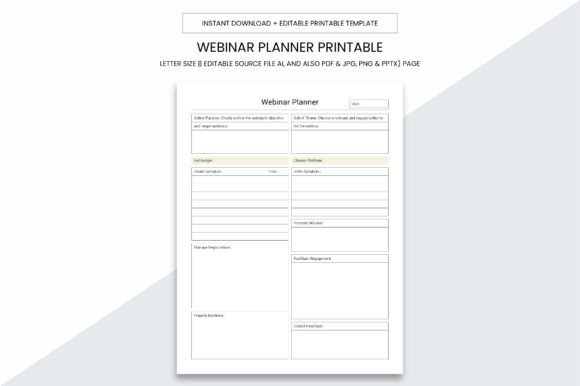
Webinar Planner Printable Kdp Interior
Running successful webinars takes more than just a great idea—it requires thoughtful preparation, consistent tracking, and adaptable organization. Whether you're launching your first live session or managing dozens per month, the Webinar Planner Printable Kdp Interior is designed to simplify that process. It’s not just another notebook—it’s a purpose-built, 109-page digital toolkit created for clarity, flexibility, and real-world usability.
What Exactly Is This Planner?
The Webinar Planner Printable Kdp Interior is a ready-to-use, editable interior file set—designed specifically for creators, coaches, consultants, educators, and small business owners who want to plan, execute, and refine webinars with confidence. Unlike generic planners, this one anticipates the full lifecycle of a webinar: from ideation and audience research to tech checks, speaker notes, post-event follow-up, and even performance analysis.
It's delivered as a digital download—no shipping, no waiting. Once purchased, you get immediate access to multiple file formats: Adobe Illustrator (.ai) for deep customization, plus high-resolution PDF, JPG, PNG, and PowerPoint (.pptx) versions. That means whether you're editing in design software, printing at home, sharing slides with co-hosts, or uploading directly to Kindle Direct Publishing (KDP), you’re covered.
Why Size & Format Matter
This planner uses an intentional, practical size: 8.5 x 11 inches. Why? Because it fits standard printers, binders, and local print shops—no awkward scaling or cropping. And with no bleed, every page prints cleanly, edge-to-edge, without risk of important content being cut off.
Each file is optimized for professional output: 300 PPI resolution ensures crisp text, clean lines, and legible checkboxes—even when printed on matte or glossy stock. That quality makes it ideal for both personal use and commercial applications—including creating your own KDP paperback or spiral-bound planner to sell.
Who Benefits Most From This Tool?
- Online Educators & Coaches: Use the built-in script outlines, timing trackers, and Q&A prep pages to stay on message—and on schedule—during live delivery.
- Small Business Owners: Turn webinars into lead-generation engines by documenting outreach plans, registration metrics, and conversion follow-ups—all in one place.
- KDP Sellers & Digital Product Creators: The included 109-page PDF is formatted and ready for KDP upload—complete with proper margins, interior consistency, and Amazon-compliant structure.
- Marketing Teams & Freelancers: Repurpose sections across campaigns—track A/B test results for subject lines, landing pages, or CTAs using customizable tables and reflection prompts.
Real-World Uses You Might Not Expect
While “webinar planning” sounds niche, users consistently report applying this tool beyond its original intent:
- Virtual Workshop Design: Adapt the agenda templates and engagement checklists for multi-session training programs—even asynchronous ones.
- Podcast Episode Prep: Reuse the speaker talking points, guest briefing sheets, and tech checklist pages for audio shows.
- Client Onboarding Sequences: Map out automated email flows alongside live touchpoints using the timeline and milestone tracker pages.
- Team Collaboration Hub: Print select pages and post them in shared workspaces—or share editable PPTX files for collaborative editing during planning sprints.
Strengths That Stand Out
What makes the Webinar Planner Printable Kdp Interior different from free templates or generic notebooks?
- Intentional Structure: Pages flow logically—from pre-webinar research and goal setting, through rehearsal and tech setup, to post-event analytics and improvement notes.
- Editability Without Compromise: The .ai source file lets you change fonts, colors, logos, or layout—while preserving professional spacing and alignment.
- Print-Ready Consistency: Every page follows the same visual language: clear headings, intuitive icons, balanced white space, and subtle cues for action items.
- KDP-Optimized From Day One: No guesswork about margins, gutter width, or font sizing—the 109-page PDF meets Amazon’s latest interior requirements out of the box.
Practical Considerations Before You Begin
Like any tool, effectiveness depends on how—and how often—you use it. Here’s what to keep in mind:
- Digital vs. Physical Use: While fully printable, many users start digitally—filling PDFs with annotations or using tablets with stylus support. Others prefer printing weekly spreads and binding them into a physical logbook.
- Customization Takes Time: The .ai file offers maximum flexibility—but if you're unfamiliar with Illustrator, plan extra time (or consider hiring a designer for minor tweaks).
- Not a Replacement for Tech Tools: This planner complements platforms like Zoom, Webex, or StreamYard—it doesn’t replace them. Think of it as your strategic layer, not your infrastructure.
- Commercial Licensing Clarity: You’re permitted to use this interior for your own KDP publications or client projects—no attribution required. However, resale of the raw files (as-is) is prohibited.
How to Get Started—Fast
You don’t need to overhaul your workflow to benefit. Try this simple 3-step launch:
- Pick One Upcoming Webinar: Choose your next session—even if it’s two weeks away.
- Open the PDF Version: Start with the “Webinar Overview” and “Goal & Audience Profile” pages. Fill in just those two sections before anything else.
- Print & Use the Tech Checklist: Run through it 48 hours before going live—even if you’ve used the platform dozens of times. Small oversights add up.
That’s it. In under 20 minutes, you’ll already be operating with more intention—and less last-minute scrambling.
When This Planner Fits Best (And When It Might Not)
This tool shines when you value structured flexibility: enough guidance to eliminate uncertainty, but enough blank space to adapt to your voice, brand, and goals. It’s especially valuable if you:
- Host webinars regularly—not just once a year.
- Want to improve consistency across sessions (e.g., branding, pacing, engagement tactics).
- Need documentation for clients, team members, or internal reporting.
- Are building a productized service or digital course—and want reusable assets.
It may be less essential if you only host highly informal, impromptu sessions—or rely entirely on AI-generated scripts and auto-scheduled tools without reviewing outcomes. Even then, many users find value in the reflection pages alone.
A Final Thought: Planning Is Part of the Performance
Your audience doesn’t see the hours you spend researching topics, testing links, rehearsing transitions, or analyzing drop-off rates. But those invisible efforts shape their experience—whether they stay for 5 minutes or the full hour. The Webinar Planner Printable Kdp Interior helps make those efforts visible, repeatable, and measurable.
It won’t write your content for you. It won’t guarantee attendance. But it does give you a consistent, thoughtful, and professional foundation—page after page, webinar after webinar. And sometimes, that’s exactly what separates a good session from a truly memorable one.