2025 Digital Planner for Shopify Canva KDP Interior
If you're launching, scaling, or refining a Shopify store in 2025—and especially if you create digital products for platforms like Etsy, Amazon KDP, or your own site—the 2025 Digital Planner for Shopify Canva KDP Interior isn’t just another template. It’s a working operational hub designed around how real shop owners think, plan, and execute. Unlike generic planners that assume one-size-fits-all workflows, this interior is built from the ground up for creators who wear multiple hats: marketer, product developer, brand strategist, and fulfillment manager—all in one day.
A Planner That Grows With Your Shopify Journey
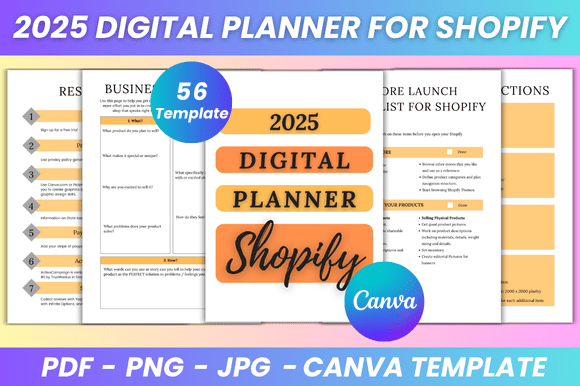
This isn’t a static calendar or a decorative PDF. Every page serves a functional purpose—whether you’re preparing to migrate from Etsy to Shopify, mapping out your first product launch, or auditing your current inventory and sales data. The 2025 Digital Planner for Shopify Canva KDP Interior includes dedicated sections like Store Launch Checklist (4 pages), Move From Etsy To Shopify, and Launch Tracker—tools most planners omit entirely. These aren’t theoretical prompts; they guide you through sequencing tasks, assigning deadlines, and cross-referencing resources before going live.
For example, the Day By Day Actions spread helps break down overwhelming goals—like “launch 3 new SKUs in Q1”—into tangible steps: sourcing mockups, writing SEO-optimized descriptions, testing checkout flow, scheduling social posts. You’re not just logging tasks—you’re aligning them with your brand voice, visual identity, and conversion goals.
Fully Editable in Canva—No Design Skills Required
All 56 pages of the 2025 Digital Planner for Shopify Canva KDP Interior come with an editable Canva link. That means you can change fonts to match your Shopify theme, adjust color palettes to reflect your logo, resize charts for readability, or insert your own product photos directly into layout placeholders. No need to wrestle with layers in Photoshop or pay a designer to tweak margins. If your brand shifts mid-year—or you pivot from handmade goods to print-on-demand—the planner adapts with you.
This flexibility matters most when consistency affects credibility. Imagine updating your About Me Page or Shop Policies section with your actual tone and legal requirements—not placeholder text. Or embedding your real Product Keywords and Product Tags into searchable fields, then exporting those lists directly into your Shopify backend. That kind of integration saves hours each month and reduces errors from manual copy-paste.
Print-Ready & Multi-Format Output—For Every Workflow
You’ll receive high-resolution, print-ready PDFs (A4 size, no bleed), plus JPG and PNG files. Why does format variety matter? Because your workflow isn’t linear. You might draft notes in the PDF version on your tablet during morning planning, export the Sales Tracker as a PNG to drop into a team Slack channel, and print the Order Management sheet for quick reference while packing orders. The Income Tracker and Expenses Tracker are laid out clearly enough to use alongside accounting software—not replace it, but complement it with visual context.
The clean, minimal design avoids visual clutter without sacrificing functionality. There’s no distracting graphics competing with your data—just intentional white space, consistent typography, and logical grouping (e.g., all fulfillment tools—Shipping Log, Return Tracker, Order Form—are clustered together). That clarity makes scanning and updating faster, especially when juggling multiple roles.
Who Benefits Most—and When It Might Not Fit
This planner shines for solopreneurs and small teams managing end-to-end Shopify operations: educators selling digital courses, crafters expanding into e-commerce, bloggers launching merch lines, or KDP publishers building cohesive brand ecosystems. Its depth supports users who need structure but resist rigidity—those who want guidance without being boxed in.
It’s less ideal if you only need a basic monthly calendar or rely exclusively on automated tools like QuickBooks or Trello for task management. While the Task Chart and To Do List are robust, they don’t sync live with external apps. Think of them as your central “source of truth” document—not a replacement for automation, but the living blueprint that informs how and where you automate.
Real Use Cases Across Roles
- Freelancers use the Business Overview and Your Shop Goals pages to clarify positioning before pitching clients—and update the Resources section with templates, tools, and contract links they reuse across projects.
- Educators and course creators lean into the About Me Page (2 versions included) and Your Logo placement to build trust before launching a new cohort—and track enrollment timing against the 2025 Monthly Planner.
- KDP publishers treat the Product Description and Product Tags spreads as SEO workspaces, drafting and refining metadata before pasting into Amazon’s backend—and cross-checking keyword alignment with their Shopify blog content.
- Small retailers use the Shop Inventory and Product Inventory pages side-by-side: one for SKU-level stock counts, the other for supplier lead times and reorder triggers.
Practical Details That Add Up
The 2025 Digital Planner for Shopify Canva KDP Interior delivers lifetime access and instant download—no waiting, no subscriptions. All files are A4 (8.3 x 11.7 inches), optimized for both screen use and professional printing. The “no bleed” specification ensures clean edges whether you’re printing at home or sending to a local print shop. And because it’s built for Canva, updates take minutes—not hours—even if you’re new to the platform.
Importantly, the interior reflects current best practices: the Competitor Analysis page prompts actionable comparisons (not vague “study competitors” notes), and the Ecommerce Checklist covers GDPR-compliant opt-ins, mobile checkout testing, and post-purchase email sequences—not just “set up payment gateways.” These details signal that the planner was made by someone who’s launched stores, not just designed spreadsheets.
If you’ve ever opened a blank Notion doc, stared at a blank Google Sheet, or felt overwhelmed by disconnected tools—this planner offers grounded structure. It doesn’t promise overnight success. But it does give you a clear, adaptable, and visually cohesive way to organize what matters most: your time, your brand, and your next measurable step forward in 2025.