2025 Meal Planner for Canva KDP Interior
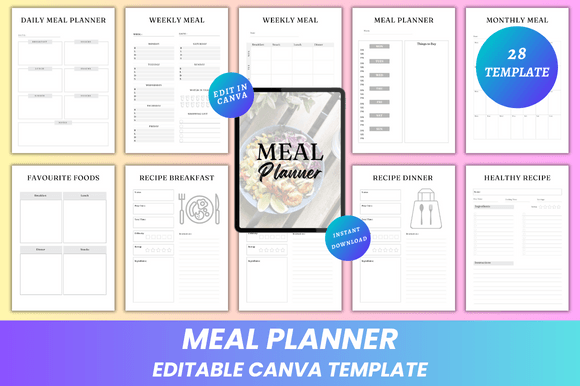
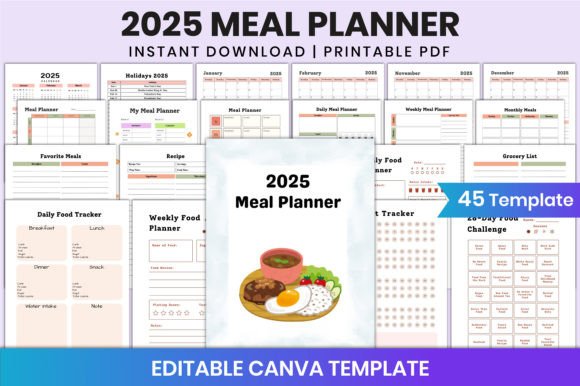
For creators building digital products on platforms like Canva and KDP, the 2025 Meal Planner for Canva KDP Interior isn’t just another printable—it’s a strategic asset. It bridges intentionality with execution: a ready-to-customize, print-ready interior designed to support real-world planning behaviors while fitting cleanly into scalable product workflows. Unlike generic templates, this planner delivers 45 distinct, high-fidelity Canva pages—each purpose-built, CMYK-optimized, and sized precisely at 8.5 × 11 inches with 300 DPI resolution. That means no guesswork in production, no last-minute formatting compromises, and no quality loss when uploaded to KDP or shared with clients.
Why This Planner Fits Into Your Long-Term Product Strategy
When you’re developing planner-based offerings—whether for personal use, client deliverables, or passive income via KDP—you’re not selling paper. You’re selling structure, clarity, and behavioral scaffolding. The 2025 Meal Planner for Canva KDP Interior supports that by embedding proven planning layers: meal tracking, habit formation, fitness alignment, grocery logistics, and reflection space—all within one cohesive design system. That cohesion matters. It reduces cognitive load for end users and strengthens your brand as someone who understands how people actually plan, not just how planners *look*.
Consider this: a creator launching five separate niche planners (fitness-only, recipe-only, challenge-only) spreads thin across design, testing, and marketing. But with the 2025 Meal Planner for Canva KDP Interior, you gain leverage. Its modular architecture—My Meal Planner, Daily Food Tracker, 30-Day Healthy Eating Challenge, Fitness Log, Grocery List, and more—lets you repurpose components intelligently. You might extract the food journal section for a standalone wellness bundle, adapt the weekly meal grid for a corporate nutrition workshop handout, or rebrand the habit tracker for a productivity course supplement. That flexibility multiplies ROI without multiplying effort.
Strategic Use Cases Beyond “Just Planning”
The value of the 2025 Meal Planner for Canva KDP Interior emerges most clearly when matched to specific goals—not broad categories like “health” or “organization,” but concrete outcomes:
- For educators and coaches: Use the Weekly Food Planner and Food Journal pages to guide clients through mindful eating experiments—not as rigid prescriptions, but as reflective tools. Pair them with short prompts (“What energy shift did you notice after Tuesday’s lunch?”) to deepen engagement.
- For KDP publishers: Bundle the editable Canva link with a companion PDF guide titled “How to Customize Your Meal Planner for Maximum Consistency”—then price it as a premium tier. That transforms a static template into an actionable learning experience.
- For freelancers and small teams: Adopt the Monthly Fitness + Meals Sync spread to align nutrition and movement goals across project sprints. When deadlines tighten, seeing meals and workouts mapped side-by-side prevents reactive choices that derail progress.
- For content creators: Repurpose the Favorite Meals and Recipe pages into Instagram carousels or Pinterest pins—each page becomes a visual hook for audience interaction (“Tag your go-to healthy dinner!”).
What to Consider Before You Edit—or Sell—This Planner
Having access to 45 editable Canva pages is powerful—but only if your edits serve a clear objective. Random customization dilutes impact. Before opening the Canva link, ask:
- Who is the primary user—and what decision are they trying to simplify? If it’s busy parents, prioritize grocery list visibility and batch-cooking notes over aesthetic flourishes. If it’s fitness newcomers, emphasize the 28-Day Food Challenge progression logic—not decorative borders.
- Where does friction live in their current routine? Do they abandon meal plans because recipes feel inaccessible? Then strengthen the Recipe page with space for substitutions and pantry staples. Do they skip logging because it feels tedious? Simplify the Daily Food Tracker to three fields: meal, energy level (1–5), and one-word reflection.
- What signals consistency—not just completion? A filled-in planner isn’t success. Consistent use over four weeks is. That’s why the Habit Tracker and Thank You Page aren’t afterthoughts—they’re behavioral anchors. Build in gentle reminders (e.g., “Review your top 3 meals from last week”) directly into those sections.
Also note: this listing includes high-quality print-ready PDFs—but those files assume intentional design decisions were made upstream in Canva. If you edit colors, fonts, or layout spacing without checking CMYK fidelity or 300 DPI integrity, your KDP uploads may render poorly. Always export final PDFs using Canva’s “Print” preset—not “Web”—and verify margins and bleed settings match KDP’s latest guidelines (this planner uses No Bleed, which simplifies compliance).
Risks of Using the Planner Without Strategic Alignment
Without context, even a well-designed tool can backfire. Here’s what to watch for:
- Overloading users with options: Offering all 45 pages at once—especially early in adoption—can overwhelm rather than empower. Start with a core set: Weekly Meal Planner, Grocery List, and Daily Food Tracker. Introduce the Fitness Goal or 30-Day Challenge only after baseline habits stabilize.
- Treating editing as decoration, not design: Swapping fonts or adding clipart doesn’t improve usability—it often obscures hierarchy. Prioritize legibility, consistent spacing, and intuitive flow. Test edits by printing one page and using it for 48 hours before scaling changes.
- Misaligning with audience literacy: A nutritionist’s audience may benefit from macronutrient columns; a general wellness audience likely needs plain-language prompts instead. Adapt language—not just layout—based on actual user understanding.
Building Long-Term Value From One Planner Interior
The 2025 Meal Planner for Canva KDP Interior gains durability when treated as a living system—not a static download. Think beyond 2025: the calendar pages anchor it to a year, but the structural logic—daily/weekly/monthly rhythms, goal-tracking loops, reflection prompts—transcends time. You can reuse the same layout framework in 2026 with updated dates and minor tweaks. Better yet, layer in your own intellectual property: add custom reflection questions, embed QR codes linking to video tutorials, or insert branded resource lists in the Notes section.
That’s where real differentiation happens. Anyone can sell a meal planner. Few build ecosystems around it. The 2025 Meal Planner for Canva KDP Interior gives you the foundation—not the finish line. Your role is to decide what behavior you want to reinforce, what insight you want users to uncover, and what next step you want them to take after closing the planner. Is it cooking a new recipe? Sharing a win in your community group? Booking a follow-up call? Design backward from that moment.
Finally, remember: tools don’t create discipline. They reveal it. The 2025 Meal Planner for Canva KDP Interior won’t make someone eat better—but it will make their choices visible, repeatable, and improvable. That visibility is where strategy begins. And when your product helps others see their patterns more clearly, you’re no longer selling a planner. You’re enabling better decisions—one meal, one day, one month at a time.