Editable Meal Planner Canva KDP Interior
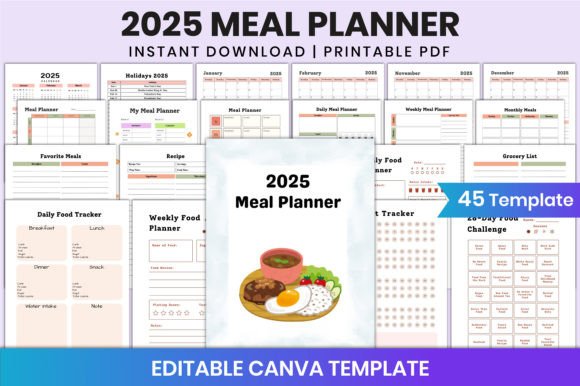
Imagine launching a meal planning product that looks polished, feels intuitive, and sells without you touching a single line of code—or hiring a designer. That’s the power of the Editable Meal Planner Canva KDP Interior. It’s not just another printable—it’s a fully customizable, print-ready interior designed specifically for Kindle Direct Publishing (KDP), yet flexible enough to serve creators across niches: health coaches building client tools, food bloggers expanding their digital shop, educators teaching nutrition, or even small-batch cookbook authors testing concepts before full production.
Every page is built in Canva—no design software required. You can change fonts to match your brand voice (think clean sans-serif for wellness professionals or warm handwritten styles for cozy home-cooking audiences), adjust color palettes to align with seasonal campaigns (pastels for spring detox guides, earthy tones for fall harvest meal plans), resize sections to highlight key features like calorie tracking or recipe cards, and drop in your own food photography to build trust and visual consistency. Layouts aren’t locked—you can rearrange daily planner grids, expand grocery list sections, or condense monthly overviews based on how your audience actually uses them.
Real-World Uses Beyond KDP
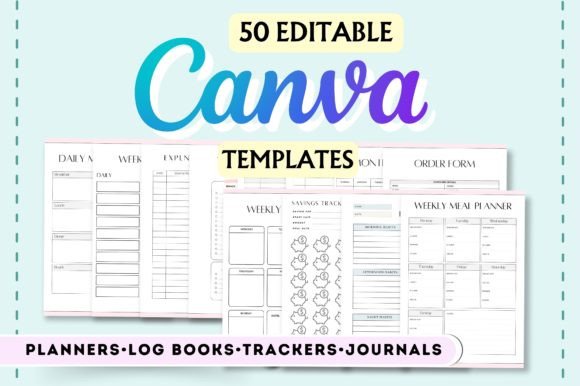
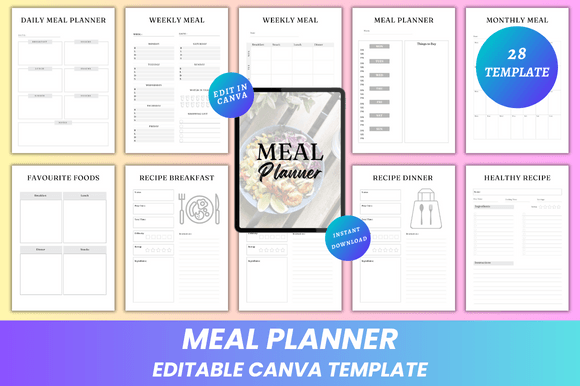
While it’s optimized for KDP interiors (A4 size, no bleed, CMYK-safe PDFs), this template shines far beyond Amazon. A registered dietitian might adapt the Calorie Journal and Healthy Recipe pages into a client onboarding workbook—then export as a branded PDF with her logo and consultation notes section. A meal prep YouTuber could use the Cooking Challenge and Snack Ideas pages to create a free lead magnet, customizing colors and adding video QR codes directly in Canva before exporting high-res JPGs for email campaigns.
Small business owners running local cooking classes? Pull the Recipe Cards and Inventory Tracker pages into a workshop handout—swap generic icons for photos of their kitchen space, add class dates to the Notes section, and print double-sided on recycled paper for an eco-conscious touch. Educators can simplify the Weekly Meal spread into a laminated classroom poster, using the editable layout to focus only on breakfast/lunch/dinner columns—and skip dinner entirely for after-school snack labs.
Design Choices That Serve Your Audience
The 28-page structure isn’t arbitrary—it’s organized around real behavior. People don’t plan meals in isolation. They track what they eat (Daily Meal Planner), reflect weekly (Weekly Meal), project ahead monthly (Monthly Meal), and loop back to refine (Favourite Foods, Recipes To Try). The dual-page layouts—like two versions of Groceries List or Recipe Planner—give users choice: one optimized for quick scanning at the store, the other for detailed prep at home.
That clean, minimal aesthetic isn’t just trendy—it’s functional. Ample white space reduces cognitive load. Consistent typography hierarchy (headings > subheadings > body) guides the eye without instruction. And because all files export as print-ready PDFs *and* web-friendly JPG/PNGs, you’re covered whether someone prints at home, orders professionally, or shares digitally via Notion or Google Drive.
How to Keep Customization Purposeful
Editing freedom is powerful—but unfocused changes dilute impact. Before tweaking, ask: Who’s using this, and what’s their first action? If your audience is time-crunched parents, prioritize clarity over decoration—keep the Meal Ideas grid large and legible, use bold category headers (Breakfast • Lunch • Dinner • Snacks), and avoid stacking too many fonts. For a keto-focused audience, swap “Calorie Journal” for “Net Carb Tracker” in the editable text—and update the unit labels accordingly.
Photos matter—but only when intentional. Don’t add food images just because you can. Use them where they solve a problem: a styled flat-lay beside the Recipe Breakfast page shows portion size; a pantry photo next to Inventory Tracker reinforces real-world usage. And always test contrast—light text on pale backgrounds fails accessibility standards and strains eyes during evening planning sessions.
What You Actually Get—and Why It Matters
- Editable Canva Link: No waiting, no compatibility headaches. Open, customize, export—in minutes.
- High-Quality Print-Ready PDFs: True A4 sizing (8.3 x 11.7 inches), no bleed, CMYK-optimized for sharp, consistent color at any print shop.
- JPG & PNG Files: Ideal for social media previews, email headers, or embedding in digital courses.
- Lifetime Access + Instant Download: Update your planner for new seasons, clients, or platforms—no recurring fees.
This isn’t about replacing your expertise. It’s about removing friction between your idea and its execution. You bring the knowledge—the meal science, the flavor pairings, the habit-building psychology. This template brings the structure, polish, and flexibility to deliver it cleanly.
Whether you’re packaging it as a $7 KDP workbook, bundling it with a $97 coaching program, or giving it away to grow your email list—what makes the Editable Meal Planner Canva KDP Interior valuable isn’t just what’s included. It’s how easily you can make it yours. Not generic. Not templated. Yours—down to the font weight, the margin width, the photo you choose for “My Favourite Recipe.” That specificity is what builds recognition, trust, and repeat engagement.
So open the link. Tweak one page—just the Thank You note at the end. Change the color. Add your name. Export. See how fast something professional, personal, and ready-to-use comes together. Then imagine what you’ll do with the rest.