Conference Planner Kdp Interior
Running conferences—whether for your business, nonprofit, classroom, or creative project—means juggling dozens of moving parts: speaker schedules, venue logistics, budget tracking, attendee lists, tech checks, and follow-up tasks. Without a consistent system, details slip, deadlines blur, and energy drains into coordination instead of connection. The Conference Planner Kdp Interior is designed not as another generic notebook, but as a purpose-built operational backbone—one that works whether you're planning your first local workshop or scaling a multi-day industry summit.
A Practical Foundation, Not Just Pretty Pages
At 8.5 x 11 inches, the Conference Planner Kdp Interior fits comfortably on desks, in binders, and beside laptops—no awkward cropping or cramped margins. Its “no bleed” layout ensures clean, professional edges when printed, eliminating guesswork during trimming or binding. That practical size isn’t arbitrary: it aligns with standard US letter paper, local print shop requirements, and Amazon KDP’s interior specifications—so what you design prints exactly as intended.
This isn’t a static PDF you fill once and forget. It’s a digital download that includes editable source files in Adobe Illustrator (.ai), plus layered PDF, JPG, PNG, and even PPTX versions. If you’re customizing branding for your coaching business, adapting sections for academic conferences, or prepping a white-labeled version for clients, the Illustrator file gives full control over fonts, colors, spacing, and layout—without needing advanced design skills.
Ready Where You Need It: Print, Publish, or Personalize
The Conference Planner Kdp Interior delivers 109 fully formatted, print-ready PDF pages—optimized at 300 ppi for crisp text and clean lines. Whether you’re printing locally for your team’s in-person prep sessions or uploading directly to KDP to publish your own planner, the file meets technical standards out of the box. No reformatting. No pixelation. No last-minute panic over margins or resolution warnings.
For educators coordinating school-wide PD days, the structured agenda templates help sequence breakout sessions while leaving room for real-time notes. Freelance event producers use the editable AI file to insert client logos, adjust color schemes, and add proprietary checklists—then export fresh PDFs for each new project. Bloggers and course creators repurpose the presentation prep pages (speaker briefs, slide outlines, Q&A logs) across multiple events—saving hours per launch.
Who Benefits—and Why It Fits Real Workflows
Small business owners often wear every hat: marketer, logistics coordinator, and host. With the Conference Planner Kdp Interior, they consolidate vendor contracts, room setup diagrams, and post-event surveys into one physical or digital logbook—reducing tab-switching and duplicate entries. One user reported cutting pre-conference admin time by nearly 40% after switching from scattered Google Docs and sticky notes.
Freelancers and solopreneurs benefit from its dual-use flexibility. Use it personally to track pitch timelines and speaker outreach—or commercially, as a branded tool to offer clients a turnkey planning experience. Since the source files are editable, adding your service packages or retainer terms takes minutes—not days.
KDP publishers appreciate how seamlessly the 109-page PDF integrates into their workflow. It’s pre-structured with logical section breaks (pre-event, day-of, post-event), consistent typography, and KDP-compliant margins—so formatting for paperback or hardcover takes under an hour. No need to rebuild headers, page numbers, or table-of-contents logic from scratch.
Thoughtful Design, Not Just More Space
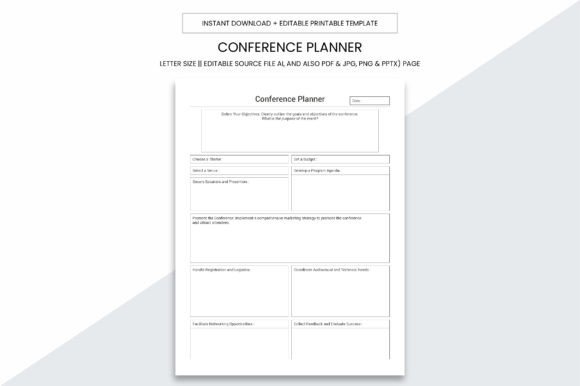
It’s not about volume—it’s about intentionality. Each page serves a clear function: a dedicated speaker contact sheet with space for dietary notes and AV requests; a session timeline grid that visually maps overlapping tracks; a budget tracker with built-in variance columns; even a “lessons learned” reflection spread for continuous improvement. These aren’t decorative placeholders—they mirror actual pain points observed across hundreds of real conference planning cycles.
For example, the “Tech & Setup” spread includes checkboxes for Wi-Fi passwords, projector compatibility, mic types, and backup power—all grouped so nothing gets missed during venue walkthroughs. The “Attendee Engagement Log” helps facilitators note who contributed during discussions, which topics sparked follow-up questions, and which handouts were most requested—valuable intel for future content development.
What to Keep in Mind Before You Start
This planner excels when used as a central hub—not a replacement for digital tools like Calendly or Trello. Think of it as your grounded reference: where you record final decisions, sketch floor plans, sign off on speaker agreements, or annotate printed run sheets. If your workflow relies heavily on real-time cloud collaboration, pair the Conference Planner Kdp Interior with shared digital docs—but keep critical approvals, visual layouts, and reflective notes in this tangible, distraction-free format.
Also, while the AI file offers deep customization, minor edits (like changing a font or adjusting a column width) are straightforward. Major structural changes—say, converting all two-column layouts to single-column—require basic Illustrator familiarity. If you’re new to vector editing, start with the PDF and use annotation tools (Adobe Acrobat, GoodNotes, or Preview) until you’re ready to dive into the source file.
More Than Organization—Clarity, Confidence, Consistency
When you know where every speaker bio lives, how much you’ve spent on catering versus AV, and which session generated the strongest feedback, decision-making shifts from reactive to strategic. The Conference Planner Kdp Interior supports that shift—not by promising perfection, but by removing friction from documentation, reducing mental load, and making patterns visible.
One community college program coordinator used it to standardize planning across five departments—training staff to use the same section labels and review cadence. Within three months, cross-departmental event handoffs became faster, reporting was more consistent, and post-event debriefs focused less on “what went wrong” and more on “what worked—and how do we scale it?”
That’s the quiet value: not just keeping information in one place, but building a repeatable, adaptable framework. Whether you’re planning a single quarterly meetup or launching a recurring conference brand, the Conference Planner Kdp Interior grows with your goals—because its structure supports thinking, not just filling.