Garden Planner Canva KDP Interior
Whether you're launching a small-batch gardening journal on Amazon KDP, designing a seasonal planner for your eco-conscious audience, or building a cohesive brand ecosystem around sustainable living, the Garden Planner Canva KDP Interior serves as a foundational production asset—not just a template, but a workflow accelerator. It bridges creative intent and practical output: you design once in Canva, export cleanly, and deploy across print-on-demand platforms, digital downloads, or client deliverables—without wrestling with layout software or outsourcing formatting.
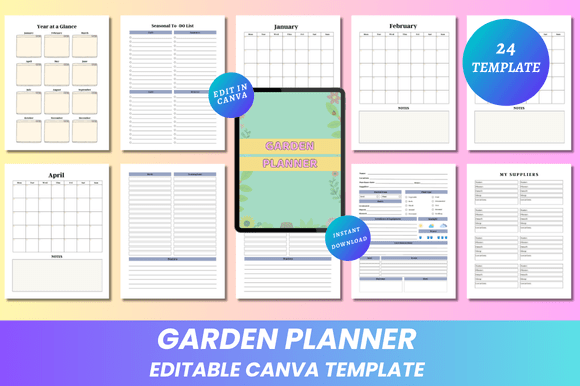
This interior is built for creators who value control without complexity. Every page is fully editable in Canva—fonts, spacing, color palettes, photo placements, icon sets, and even grid structures adapt to your brand voice or seasonal theme. That means if your audience responds strongly to muted sage greens and hand-drawn botanical illustrations in April, you can adjust the March and April spreads in under ten minutes—and keep consistency across all 24 pages. No reworking master files. No version confusion. Just one editable link, updated once, reflected everywhere.
How It Fits Into Your Real-World Workflow
Think of the Garden Planner Canva KDP Interior not as a standalone product, but as an integrated node in your planning-to-publishing pipeline. Before a launch, it helps you pressure-test structure: Does your “Year at a Glance” page align with how your target audience actually plans crops? Does the “My Suppliers” section leave enough room for local nursery logos—or do you need to shift column width? You’re not guessing. You’re iterating visually, in real time, using the same tool your designer (or future self) uses daily.
During execution, it eliminates bottlenecks. Instead of waiting for a designer to revise margins for KDP’s 8.5 × 11 inch trim requirements, you adjust them yourself—no bleed, no crop marks, no guesswork. The included PDFs are print-ready out of the gate, but because the Canva link stays live, you can also generate fresh JPG or PNG exports anytime—for social previews, email newsletters, or client presentations—without touching desktop software.
After launch, it supports scalability. If you add a companion “Compost Tracker” workbook next season, its typography, grid rhythm, and visual hierarchy will match seamlessly because it shares the same editable foundation. Consistency isn’t enforced by style guides alone—it’s baked into the file itself.
Practical Integration With Other Tools and Platforms
The Garden Planner Canva KDP Interior doesn’t live in isolation. It works alongside tools you already use:
- Canva Pro features—like Brand Kit, magic resize, and background remover—enhance customization speed. Upload your logo, lock your primary palette, and apply it across all monthly To-Do List headers with one click.
- KDP dashboard—the 8.5 × 11 inch, no-bleed PDFs upload directly. No preflight checks needed. No warnings about resolution or margins. You verify once, then focus on cover design and keyword optimization.
- Email marketing platforms—export individual pages (e.g., “Seasonal To-Do List” or “Garden Layout”) as high-res PNGs to embed in nurture sequences. Subscribers get actionable visuals—not just text reminders.
- Client projects—freelancers and educators use the editable link to co-design with clients: share access, let stakeholders tweak layouts or add custom notes, then lock and export final versions when approved.
It also complements physical workflows. Print the “Shopping List” or “Notes” pages at home before a nursery run. Laminate the “Garden Layout” spread and hang it in your shed. Use the “January” through “December” pages to track planting dates alongside your weather app or soil sensor data—then update the planner retroactively to refine next year’s timing.
Design Decisions That Support Long-Term Use
The clean, minimal aesthetic isn’t just visual preference—it’s functional discipline. Ample white space reduces cognitive load when scanning weekly tasks. Consistent heading hierarchy (H2 for months, H3 for subsections like “Soil Prep” or “Pest Watch”) makes printed pages scannable at a glance—even mid-garden, holding a trowel. And because every element is editable, you’re never locked into someone else’s interpretation of “minimal.” You decide whether “Thank You” appears on its own page or merges with “Notes.” You choose whether “Belongs To” includes a line for handwritten names or a QR code linking to your newsletter.
Quality control is built in. All fonts are web-safe and embedded in exported PDFs. Image placeholders support transparent PNG uploads—so your custom illustrations retain crisp edges. And because the file is structured page-by-page—not as one long scroll—you avoid common Canva export issues like misaligned columns or truncated text boxes.
Workflow Examples Across User Types
Small business owners use the “My Suppliers” page to list local vendors, adding photos and contact details—then export that single page as a branded handout for farmers’ market booths. Later, they swap in wholesale partners for bulk printing and reuse the same layout.
Educators repurpose the “Seasonal To-Do List” as a classroom activity: students fill in native plant recommendations for their region, then present findings using the “Garden Layout” grid to scale. The editable nature means no photocopying outdated versions—just refresh and re-print.
Freelance designers treat the Canva link as a starter kit. They duplicate the file, rename it per client (“Maple Hill Herb Co. Planner”), adjust colors to match brand guidelines, insert custom icons, and deliver both the editable link *and* print-ready PDFs—adding value without doubling design time.
Hobbyists and gardeners start simple: paste smartphone photos of seed packets into the “Shopping List,” annotate them with notes like “start indoors, 6–8 weeks before last frost,” then export as JPG to reference from their phone while shopping.
What Makes This More Than Just Another Planner?
It’s the combination of precision and flexibility. The 24-page count covers full-year planning without bloat—no filler pages, no redundant sections. Each feature exists because it solves a documented pain point: “Year at a Glance” avoids flipping between months; “Garden Layout” supports spatial reasoning before breaking ground; “To-Do List” and “Shopping List” are separated so you’re not confusing “prune roses” with “buy compost bins.”
Lifetime access means updates aren’t tied to subscriptions. When new design trends emerge—say, soft gradients or illustrated borders—you’ll find refreshed versions added to your library. But crucially, your existing edits remain intact. You’re not forced to rebrand everything just because a new layout option arrives.
And because it’s delivered as both editable (via Canva) and static (PDF/JPG/PNG), you choose your level of involvement. Launch fast with the ready-made files. Refine later. Adapt for niche audiences—urban balcony growers, permaculture beginners, school garden coordinators—without rebuilding from scratch.
If you work where intention meets action—whether that’s publishing, teaching, designing, or growing—you don’t need more templates. You need the right foundation, built to evolve with your goals. The Garden Planner Canva KDP Interior is that foundation: precise in specification, open in execution, and designed to stay useful long after the first season ends.