Online Shop Planner Canva Kdp Interior
Running an online shop—whether on Etsy, Shopify, Amazon KDP, or your own domain—demands more than great products and strong visuals. It requires clarity, consistency, and intentional structure behind the scenes. That’s where the Online Shop Planner Canva Kdp Interior stands out: a thoughtfully organized, fully editable digital toolkit built for creators who value both creative control and operational efficiency.
This isn’t just another printable PDF planner. It’s a living, adaptable workspace designed specifically for digital sellers, self-publishers, and small business owners who juggle branding, inventory, marketing, finances, and customer service—all while maintaining their unique voice and visual identity. Every page is crafted to support real decisions, not just busywork.
Why Editability Matters More Than Ever
Today’s creators don’t want static templates they must force-fit into rigid formats. They want flexibility—without sacrificing professionalism. The Editable Online Shop Planner Canva KDP Interior meets that need head-on. With full access to the Canva editor, you can adjust fonts to match your brand guidelines, resize sections to prioritize what matters most this quarter, swap color palettes to align with seasonal campaigns, and drop in product photos or mockups directly onto planning pages.
This level of customization reflects how modern workflows have evolved: hybrid, iterative, and deeply personal. A handmade jewelry seller might emphasize inventory tracking and shipping logs, while a KDP author may focus on product keywords, ad campaign metrics, and email marketing timelines. Neither needs the same layout—and neither should be forced into one.
From Planning to Execution—Without Switching Tabs
The planner bridges the gap between strategy and action. Instead of toggling between spreadsheets, notes apps, design tools, and accounting software, everything lives in one cohesive system. Need to update your return policy? It’s right there on the Shop Policies page—editable, branded, and ready to paste into your store. Prepping for a new launch? Use the New Product Planner to map keywords, tags, pricing tiers, and promotional coupons before listing a single item.
Even operational tasks gain momentum when contextualized. The Order Tracker doesn’t just log dates—it connects to your Shipping Log and Return Tracker, helping you spot patterns like recurring carrier delays or high-return SKUs. Similarly, the Sales Tax Tracker works alongside your Income At A Glance and Expenses Tracker, giving you a clearer picture of true profitability—not just top-line revenue.
Designed for Real Business Rhythms
Seasonal shifts, platform updates, algorithm changes—online selling rarely follows a linear calendar. That’s why this planner includes dynamic tools like the Campaign Tracker and Advertising Tracker, which let you compare ROI across Facebook Ads, Pinterest pins, or Amazon Sponsored Brands without exporting data manually. You can even use the Social Media Tracker to plan content around product launches, holidays, or community engagement goals—then link posts directly to relevant product pages using embedded notes.
And because creators often wear multiple hats, practical utilities like the Password Tracker, Contact List, and Bill Tracker reduce cognitive load. No more digging through email chains or sticky notes to find a vendor’s invoice due date or a collaborator’s login details. Everything stays anchored in context—next to your To Do List and Checklist, so nothing slips through the cracks.
Print-Ready, Digital-First
You get more than editable Canva files—you receive high-resolution, print-ready assets too. Each template exports cleanly as a professional-grade PDF, plus JPG and PNG versions for quick sharing or embedding in presentations. Whether you prefer writing longhand with a stylus on a tablet, printing weekly spreads for desk-bound planning, or laminating key pages for whiteboard-style brainstorming, the format adapts to your rhythm.
This dual-format approach reflects how working habits have diversified: some creators thrive in analog flow; others rely on cloud-based collaboration. The Online Shop Planner Canva Kdp Interior supports both—without compromise.
More Than Organization—It’s Strategic Alignment
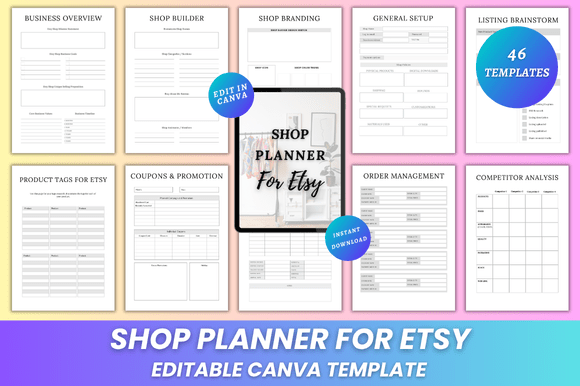
Beyond checklists and trackers, the planner includes foundational strategy pages that help clarify direction before execution begins. The Value Proposition worksheet guides you to articulate *why* customers choose you—not just what you sell. The SWOT Analysis and Competitor Analysis prompts encourage honest reflection about strengths, gaps, and market positioning—not as one-off exercises, but as living references you revisit quarterly.
Similarly, the Business Overview and Your Shop pages serve as internal north stars. They’re places to define mission, audience, tone, and growth benchmarks—not for public consumption, but for grounding every decision, from font choice in your Canva social graphics to which supplier you vet next.
How It Fits Into Broader Shifts
In recent years, the rise of micro-businesses and solopreneurship has shifted expectations around tools. Buyers no longer accept generic solutions—they seek systems that reflect their values, scale with their ambition, and evolve with their learning curve. This planner responds to that shift by offering depth without complexity: each section serves a clear purpose, avoids redundancy, and links logically to others.
It also aligns with growing demand for transparency and intentionality—especially among audiences who value sustainability, ethical sourcing, or inclusive branding. When your Shop Branding page includes space for accessibility notes, your Product Updates log tracks eco-friendly packaging swaps, and your Notes section holds reflections on community feedback, planning becomes part of your brand story—not just backend logistics.
Who Benefits Most—and How
A freelance graphic designer launching merch uses the Shop Inventory and Shop Supplies pages to forecast material costs and reorder thresholds. A romance novelist building a KDP empire leans into Product Keywords, Coupons Promotion, and Email Marketing to time newsletter launches with series releases. A zero-waste home goods shop applies the SWOT Analysis and Monthly Stats to measure impact alongside income.
Even educators teaching e-commerce fundamentals find value here—not as a final product, but as a teaching artifact. Students learn how real sellers organize operations, test assumptions, and iterate based on data—not theory.
Getting Started Is Intentional, Not Overwhelming
There’s no “right” way to begin. Some users start with the Belongs To page to claim ownership and set intentions. Others open the Business Overview first to reconnect with core goals. Still others jump straight to the Order Form or Purchase Tracker to solve an immediate bottleneck.
What makes the Editable Online Shop Planner Canva KDP Interior effective isn’t its comprehensiveness alone—it’s how each element invites thoughtful engagement. The Thank You page isn’t filler; it’s a prompt to document wins, however small. The Notes section isn’t blank space—it’s reserved for insights that emerge only after weeks of tracking, testing, and observing.
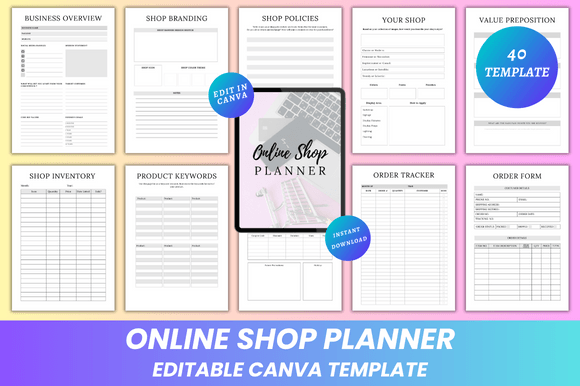
You’ll get everything listed: Editable Files, Business Overview, Shop Branding, Shop Policies, Your Shop, Value Proposition, SWOT Analysis, Competitor Analysis, Shop Inventory, Shop Supplies, Product Keywords, Product Tags, Coupons Promotion, Income At A Glance, Order Tracker, Order Form, Expense Fees, Returns Exchange, Return Tracker, Shipping Log, Purchase Tracker, Monthly Stats, Sales Tax Tracker, New Product Planner, Product Updates, Advertising Tracker, Campaign Tracker, Email Marketing, Social Media Tracker, Sales Tracker, Income Tracker, Expenses Tracker, Bill Tracker, Password Tracker, Contact List, To Do List, Checklist, Notes, and Thank You.
Ultimately, this planner works because it respects your time, honors your process, and grows with your shop—not the other way around.