Blood Sugar Planner Canva KDP Interior: A Practical, Fully Customizable Tool for Health Tracking and Publishing
Managing blood sugar levels requires consistency, awareness, and accessible tools—especially when balancing work, family, or creative projects. The Blood Sugar Planner Canva KDP Interior stands out not as a generic health journal, but as a purpose-built, editable digital interior designed for both personal use and commercial publishing on Amazon KDP. Its core value lies in flexibility: every element—from fonts and color schemes to layout spacing and icon placement—is editable directly in Canva. That means no design software expertise is required, yet the output meets professional print standards.
What Makes This Interior More Than Just a Template?
This isn’t a static PDF you annotate with a stylus or print and fill by hand. The Blood Sugar Planner Canva KDP Interior delivers an editable Canva link, giving users full control over typography, hierarchy, visual tone, and even structural flow. You can adjust font sizes for readability, shift column widths to accommodate handwritten notes, recolor trackers to match brand guidelines (if publishing), or swap out icons for more inclusive or clinical visuals. Unlike many KDP interiors that lock users into rigid 6" x 9" layouts with fixed margins, this version respects standard KDP bleed and trim requirements while remaining visually adaptable.
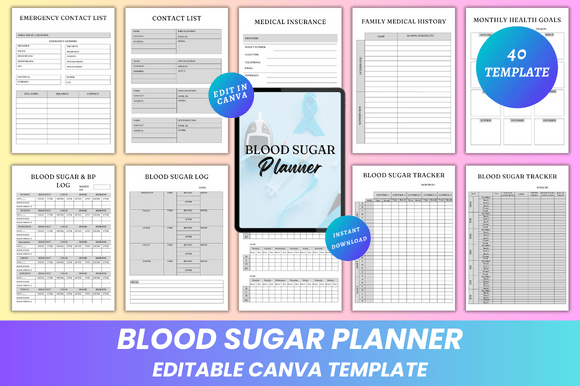
The included 8-page blood sugar tracking system—spanning morning, noontime, and evening monitoring—offers consistent structure without redundancy. Each tracker includes space for glucose readings, insulin dosage, food notes, activity, and subjective symptoms. That level of granularity supports pattern recognition over time, which matters whether you’re managing prediabetes, type 2 diabetes, or supporting a loved one’s care routine.
Designed for Real-World Use, Not Just Aesthetics
Usability emerges from thoughtful organization—not decorative flourishes. The Blood Sugar Planner Canva KDP Interior integrates functional sections like the Vital Signs Tracker, Medicine Tracker, and Symptom & Triggers Tracker in logical sequence. For example, pairing the Low Carb Food Ideas page with Favorite Meals At A Glance and a Healthy Recipe spread creates a practical nutrition workflow—not just inspiration. Similarly, the Medical Expenses and Appointment Notes pages are formatted with clear date fields and checkboxes, reducing friction during busy clinic visits or insurance calls.
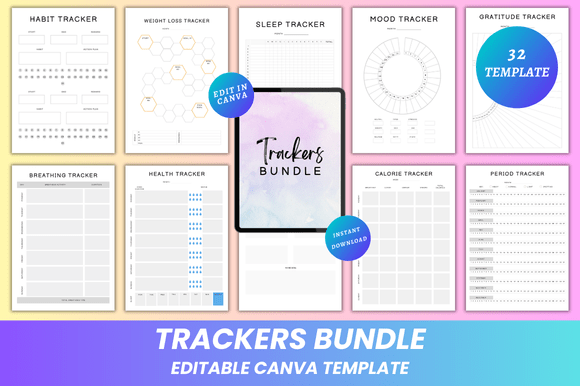
Consistency across pages reinforces habit formation. The Habit Tracker, Water Tracker, and Mood Tracker all use the same weekly grid format, so users don’t relearn navigation each time they flip pages. That predictability supports long-term adherence—especially important for those juggling multiple health goals alongside professional responsibilities.
Who Benefits Most—and How?
Professionals managing chronic conditions—like educators, freelancers, or small business owners—often lack time for complex apps or fragmented tracking. This interior works offline, requires no subscription, and fits seamlessly into existing routines. A nurse practitioner might adapt it for patient education handouts; a wellness coach could brand it with their logo and offer it as a client resource; a blogger focused on metabolic health may publish a customized version on KDP as a low-cost, high-value companion to their content.
For creators building digital products, the editable Canva link enables rapid iteration. Need to localize units (mg/dL vs. mmol/L)? Adjust language for bilingual audiences? Swap metric-only charts for imperial equivalents? All possible without touching code or hiring a designer. And because the final deliverables include high-resolution PDFs (print-ready with CMYK support), JPGs, and PNGs, there’s no guesswork about compatibility with KDP upload systems or home printers.
Quality and Reliability in Practice
Print testing confirms clean line weights, sufficient contrast between text and background, and proper margin clearance—even at the inner gutter. Page numbers appear consistently on the bottom outer corner, and section dividers use subtle yet distinct styling to avoid visual fatigue. There are no placeholder images demanding replacement; instead, blank photo frames are embedded where users might add personal references (e.g., medication labels or lab reports).
One realistic limitation: while fully editable, Canva’s free tier has export limits. Users planning frequent revisions or large batches should consider Canva Pro for unlimited downloads and access to advanced typography options. Also, although the interior supports customization, it doesn’t include automated calculations (e.g., averaging weekly glucose values). That’s intentional—it prioritizes simplicity and accessibility over technical complexity.
Workflow Integration and Long-Term Value
This interior functions best when treated as a living document—not a one-time purchase. A marketer launching a health-focused course might start with the default layout, then customize colors and headers to align with course branding before exporting PDFs for student downloads. An entrepreneur selling printed planners could generate multiple versions (e.g., “Minimalist,” “Clinical Focus,” “Family Edition”) from the same base file, saving significant production time.
Long-term value comes from sustainability: updates take minutes, not hours. If new guidelines emerge around A1C targets or carb-counting methods, you can revise relevant pages and re-export—all within the same Canva project. No need to renegotiate with designers or reformat across platforms.
Practical Recommendations for Getting Started
- Before editing: Review KDP’s latest interior specifications—especially for bleed (0.125") and safe zone (0.25"). This interior already accounts for them, but double-check after major layout changes.
- When customizing fonts: Stick to Canva’s web-safe or licensed Google Fonts to ensure consistent rendering across devices and print outputs.
- For publishers: Use the included “Belongs To” page and “Thank You” spread to reinforce branding and build trust with buyers—subtle but effective.
- For personal use: Start with the Monthly Health Goals and Emergency Contact List pages—they provide immediate utility and set context for deeper tracking.
The Blood Sugar Planner Canva KDP Interior succeeds by bridging two needs often treated separately: clinical utility and creative control. It doesn’t assume expertise—but it doesn’t limit capability either. Whether you're logging daily readings, designing a published planner, or supporting someone through lifestyle change, its balance of structure and adaptability makes it a reliable foundation—not just another template.